-
 By: Janina Criador
 - IT Guides
- Last Updated On: September 18, 2026
- Comments 0
- ⏱️7 min read

Microsoft Defender Updates & Compliance: What Leaders Need
Your security team just mentioned another Microsoft Defender update, and you nodded like you understood. Be honest: did you?
You’re not alone. Most leaders know Microsoft Defender antivirus is running somewhere in the background, quietly protecting laptops and servers. But “quietly” is the problem. When compliance audits roll around, or a client asks how you protect their data, “it’s just kind of there” isn’t an answer anyone wants to give.
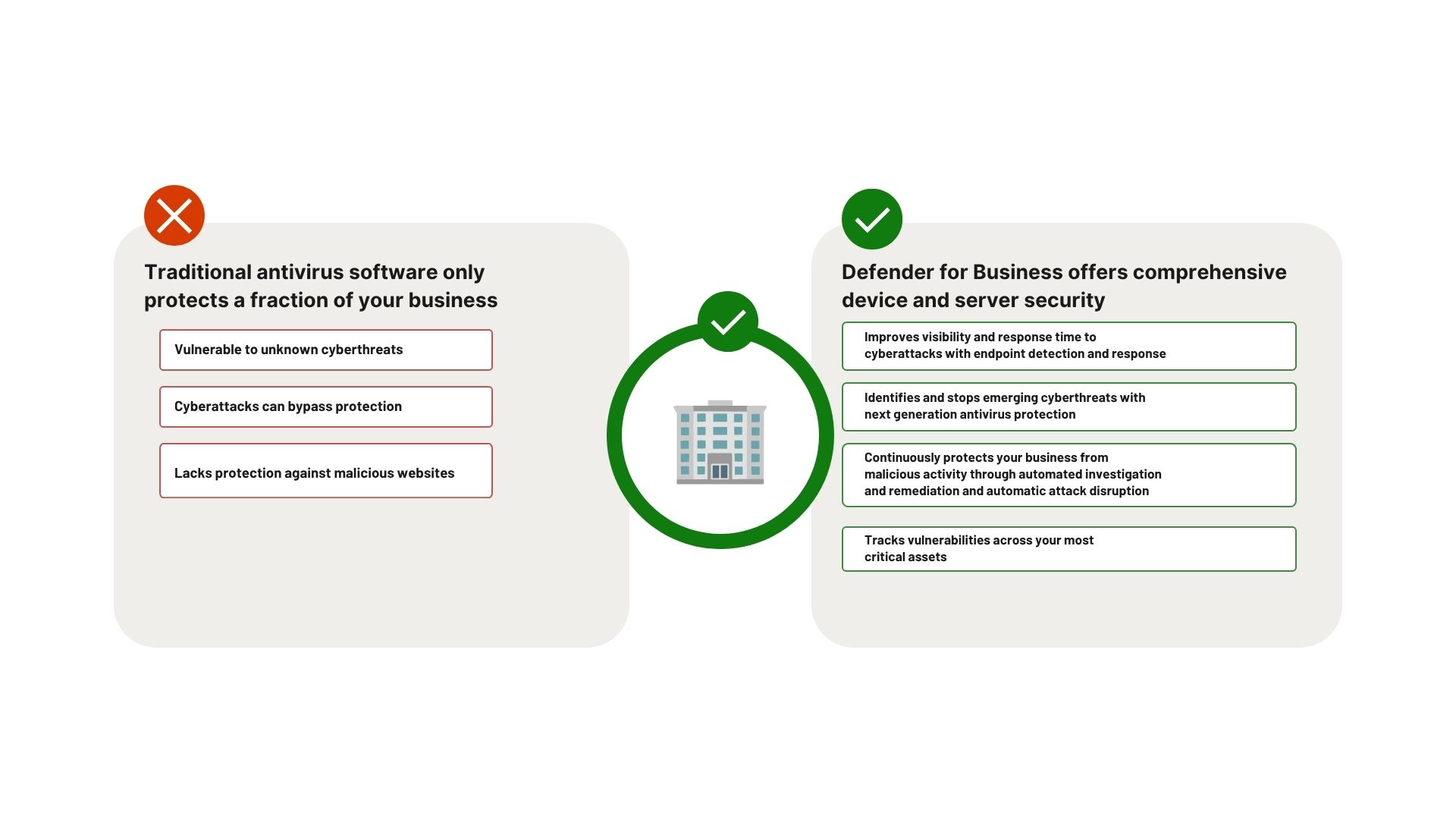
Here’s the truth: Microsoft Windows Defender has evolved from a basic antivirus tool into a full compliance and risk management asset. And if you’re not paying attention to how it’s configured, updated, and reported on, you could be sitting on a gap that costs you a client, a contract, or a very uncomfortable board meeting.
Let’s fix that. At ECF Data, we track how modern risk management assets evolve. This guide breaks down exactly what leaders need to know about Defender Microsoft updates and compliance, without the jargon.


What is Microsoft Defender?
Definition: Microsoft Defender is as a built-in, unified security platform designed to manage and monitor threats across enterprise environments.
Running automatically within Windows, it blends continuous real-time threat detection with cloud-delivered intelligence updates to stop cyberattacks before network breach. Once deployed, the system coordinates defenses through four integrated pillars:
- Microsoft Defender for Endpoint: A comprehensive endpoint suite utilizing robust behavioral sensors and cloud analytics to safeguard devices and networks.
- Microsoft Defender for Office 365:Advanced protection built to secure collaboration data, emails, and apps against phishing and malicious attachments.
- Microsoft Defender for Identity: A security capability that monitors and correlates Active Directory signals to detect compromised accounts and block insider threats.
- Microsoft Defender for Cloud Apps: A versatile defense layer that identifies and combats active cyber threats across both Microsoft and third-party SaaS applications.
By centralizing incident alerts under a single pane of glass, Microsoft Defender reduces the administrative burden of tracking individual vulnerabilities. It also lets modern hybrid organizations investigate, intercept, and automatically remediate multi-stage threats from one secure location.
What Are Security Intelligence Updates, Really?
Security intelligence updates are high-frequency data packages that provide the latest threat signatures, behavioral patterns, and heuristics to the Microsoft Defender detection engine.
Security intelligence updates are high-frequency data packages that provide the latest threat signatures, behavioral patterns, and heuristics to the Microsoft Defender detection engine.
Update | Frequency | Core Function |
| Security Intelligence Updates | Multiple times daily | Refreshes malware signatures, ransomware strains, and threat detection data. |
| Platform Updates | Monthly | Refreshes the actual anti-malware engine and local system architecture. |
| Product Updates | Periodically | Introduces new features, capabilities, and management configurations. |
Delivery methods heavily affect speed and compliance verification. Devices pull these updates directly from Microsoft via Windows Update, or through a cloud-managed channel like Microsoft Intune. If any part of that delivery chain breaks, your endpoints can look “protected” on paper while running on stale intelligence underneath.
Why Should Leaders Care About Antivirus Software?
It’s easy to assume antivirus is solely an IT problem, not a leadership problem. That thinking is outdated.
Here’s why it belongs on your radar:
- Regulators and clients increasingly ask for proof of endpoint protection, not just a promise that it exists
- A single unpatched device can become the entry point for a breach that hits your entire network
- Cyber insurance providers now review your security stack, including antivirus coverage, before issuing or renewing a policy
- Compliance frameworks like SOC 2, HIPAA, and ISO 27001 all reference endpoint security as a core control
Microsoft Defender antivirus is part of your risk posture. And risk posture is absolutely a leadership issue.
What Changed Recently?
Microsoft ships updates to Defender constantly, some visible and some behind the scenes. Recent changes have focused on:
- Faster threat detection using cloud-based machine learning
- Tighter integration with Microsoft 365 and Azure environments
- Simplified compliance reporting through the Microsoft Defender portal
- Expanded coverage across hybrid and remote work setups
The pace of these updates means a “set it and forget it” approach no longer works. What was compliant six months ago might not be today.
A Quick Gut Check
Ask your IT team these three questions this week:
- Is Defender fully enabled and updated across every device, including remote and BYOD?
- Do we have a documented record of Defender’s configuration for audit purposes?
- Who is actually reviewing Defender’s alerts, and how quickly?
If any answer is “not sure,” that’s your starting point.
How Does Defender Fit into Compliance Requirements?
Compliance isn’t just about having security tools. It’s about proving they work, consistently, and documenting that proof.
Microsoft Defender helps with compliance in a few ways:
- It generates logs and reports that auditors can review
- It integrates with Microsoft Purview and Compliance Manager for centralized tracking
- It supports policy enforcement across devices, which regulators like to see
- It offers built-in dashboards that map loosely to common frameworks
That said, Defender won’t automatically make you compliant. Compliance requires policies, training, incident response plans, and documentation that go beyond any single tool. Defender is one piece of a much bigger puzzle, but it’s a piece that regulators and auditors do look for by name.
What Auditors Actually Want to See
When it comes to endpoint protection, most audits boil down to a few core asks:
- Proof of deployment across all company devices
- Evidence of regular updates and patch management
- Alert and incident logs showing your team responds to threats
- A named owner responsible for reviewing and maintaining the system
If your team can produce these without scrambling, you’re in good shape. If not, that’s a conversation worth having before an auditor asks first.
What Should Leaders Actually Do About This?
You don’t need to become a cybersecurity expert. You need to ask the right questions and make sure the right people are accountable.
Here’s a practical action list:
- Schedule a Defender review with your IT lead or managed service provider this quarter
- Ask for a compliance snapshot showing current coverage, gaps, and last update dates
- Clarify ownership so one person or team is clearly responsible for monitoring Defender
- Set a recurring check-in, quarterly at minimum, since Microsoft updates Defender frequently
- Compare your needs to your coverage, especially if you handle sensitive client data or operate in a regulated industry
None of these requires deep technical knowledge from you. It requires consistency and a willingness to ask, “Are we actually covered?” Instead of assuming, the answer is yes.
Is Your Microsoft Defender Setup Truly Defensible?
Microsoft Defender has grown into a genuinely powerful tool, and Microsoft keeps investing in it. But powerful tools still need expert oversight—especially when compliance and client trust are on the line. That is where ECF Data comes in.
The good news is that closing your security gaps doesn’t take a massive overhaul. It simply takes a strategic review, a few honest questions, and a partner like ECF Data to provide the ongoing ownership and clarity your IT team needs.
A Note on Peace of Mind
There’s a real, measurable relief that comes from knowing your security posture is documented and defensible. It changes how you walk into a client pitch. It changes how you sleep before a renewal call with your cyber insurer.
Microsoft Defender antivirus can absolutely provide that peace of mind—it just needs the right leadership and the specialized expertise of ECF Data to get it there.
Ready to find out where your organization actually stands? Reach out to the ECF Data team today for a free Microsoft Defender and compliance review. We’ll show you exactly what’s working, what’s missing, and what to fix first—no jargon, no pressure, just clarity.