-
 By: Janina Criador
- IT Guides
- Last Updated On: November 17, 2026
- Comments 0
- ⏱️11 min read

Passing the Audit Is Easy. Surviving “Configuration Drift” Is Hard: 6 Everyday IT Changes That Invalidate Your SSP
TL;DR: What Changes Require Updating a System Security Plan (SSP) Under CMMC 2.0?
A CMMC SSP update is required whenever a change affects your CUI assessment boundary, how a NIST SP 800-171 requirement is implemented, or the assets, people, and service providers that touch Controlled Unclassified Information (CUI). Six routine changes cause most of the damage:
- New applications or SaaS tools
- New or changed vendor, MSP, or cloud access
- Permission, role, and privileged-access changes
- Remote work and new endpoint types
- Network, firewall, and segmentation changes
- OS, security tooling, and baseline configuration changes
NIST requirement 3.4.3 (track, review, approve or disapprove, and log changes to organizational systems) is where these changes should be caught. Requirement 3.12.4 is the one that requires the SSP itself. If a ticket changes your boundary or how a control works and the SSP doesn’t change with it, you have configuration drift.


Why ECF Data Cares About the Day After the Audit
At ECF Data, we help defense contractors get to CMMC, but a passed assessment isn’t the finish line. It’s a snapshot, and your environment keeps moving.
The timing makes this urgent:
- The DFARS CMMC clause took effect November 10, 2025.
- Phase 2, when many solicitations begin requiring Level 2 third-party (C3PAO) certification, is scheduled for November 10, 2026. Verify the current dates on the DoD CIO CMMC page and in 32 CFR Part 170.
- A Level 2 assessment tests 110 requirements across 320 assessment objectives. Your SSP is the map the assessor follows.
- CMMC requires an annual affirmation of continuing compliance, so the SSP must stay true for as long as you hold your certification.
The core problem: An assessment is a snapshot. Your IT environment is a movie. Every ticket closed after the snapshot is a frame that may no longer match it.
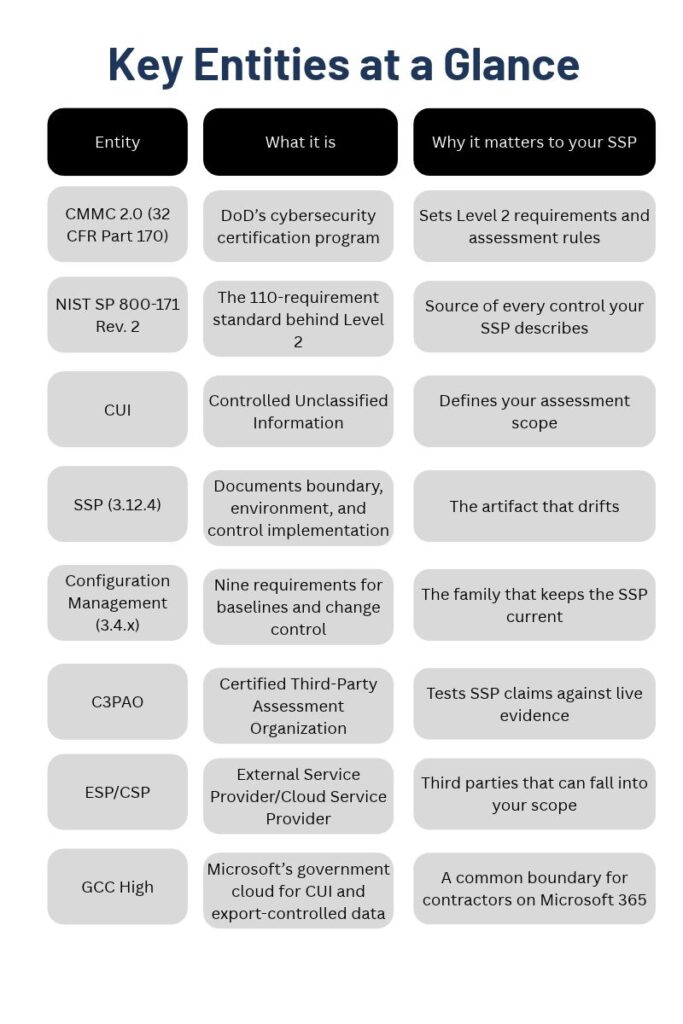
What Is Configuration Drift, and Why Does It Break Your SSP?
Configuration drift is the gradual, unintended divergence between your documented configuration (what the SSP says) and your actual configuration (what the systems do). It rarely comes from negligence. It comes from routine work: a helpdesk ticket, a project deadline, a vendor request, and an executive who needs access today.
An illustrative composite shows how it plays out. A 120-person machining contractor passes a readiness review with a clean SSP. Over the next ten months:
- Marketing adopts a file-sharing tool, and engineers use it to send drawings to a supplier
- The MSP swaps its remote monitoring agent for a different product
- Three engineers get local admin rights to run CAD plugins
- Half the engineering team moves to hybrid work on personal-router home networks
Each ticket was closed in minutes, but none triggered an SSP review. At assessment, the SSP described a boundary that no longer existed. This pattern is common in assessment of readiness work, and it is why the 3.4.x family and the SSP must work together.
The “If X → Update Section Y → Capture Evidence Z” Framework
Before the six triggers, here is the logic that organizes them.
NIST 3.4.3 is your change gate. It requires you to track, review, approve, or disapprove, and log changes. The practical fix for drift is a one-question addition to your change process:
“Does this change touch the CUI boundary, security control, or third party? If yes, a CMMC SSP update is part of ‘done.’”
Related requirements strengthen the gate:
- 3.4.4: Analyze the security impact of changes before implementation
- 3.4.5: Define, document, approve, and enforce access restrictions on changes
- 3.4.1: Establish and maintain baseline configurations and inventories
- 3.12.4: Develop, document, and periodically update the SSP
Note on SSP structure: NIST doesn’t mandate a specific SSP template. The section names below are common ones (boundary, asset inventory, network diagram, data flows, service providers, control statements). Map them to your own document.
The 6 Everyday IT Changes That Invalidate Your SSP

Trigger 1: New Applications and SaaS Tools
Why it drifts: A “free trial” or a plugin is the fastest way for CUI to leave your documented boundary.
NIST 3.4.3 change control:
- If a new app, SaaS service, browser extension, or plugin is introduced that stores, processes, or transmits CUI (including via file sync or email integration)
→ Update SSP Sections: system boundary, asset inventory, data flow diagram, and statements for 3.1.x, 3.13.x, and 3.4.9 (user-installed software)
→ Capture Evidence: approved change ticket, security impact analysis (3.4.4), updated software inventory, vendor FedRAMP Moderate (or equivalent) documentation, and a screenshot of tenant access and encryption settings - If an existing platform turns on a new feature (an AI assistant, external sharing, a new integration)
→ Update SSP Sections: data flow diagram and the 3.1.3 (control the flow of CUI) statement
→ Capture Evidence: before and after configuration exports and the approval record
The ECF Data take: Enabling a copilot or meeting-notes feature on an existing Microsoft 365 tenant can create a new CUI processing path with no “new app” ticket. Treat feature enablement as a change.
Trigger 2: New or Changed Vendor, MSP, and Cloud Access
Why it drifts: Any vendor with a path into your environment can pull itself, and you, into scope.
NIST 3.4.3 change control:
- If a new MSP, MSSP, cloud provider, or contractor gets admin or remote access, or an existing provider changes its tools or access methods
→ Update SSP Sections: external service provider list, system boundary, shared responsibility description, and statements for 3.1.12, 3.1.15, and 3.5.3 (MFA)
→ Capture Evidence: signed agreement and responsibility matrix, the provider’s CMMC status or FedRAMP authorization, MFA enforcement screenshots for provider accounts, and remote session logs - If a vendor swaps its management tooling (RMM, backup, or monitoring agent)
→ Update SSP Sections: asset inventory and security protection asset descriptions
→ Capture Evidence: updated agent inventory and deployment report
Why assessors care: The final CMMC rule addresses ESPs and CSPs directly. A provider that handles CUI is part of your assessment boundary. If your SSP doesn’t list it, the assessor will find the gap.
Trigger 3: Permission, Role, and Privileged-Access Changes
Why it drifts: Access creep is the quietest drift. Each “temporary” admin grant looks harmless on its own.
NIST 3.4.3 change control:
- If users get local admin, new security group membership, or access to a new CUI repository (a SharePoint site, file share, or enclave)
→ Update SSP Sections: role and privilege descriptions, and statements for 3.1.1, 3.1.2, 3.1.5 (least privilege), and 3.1.6
→ Capture Evidence: access request and approval ticket, current group membership export, and the latest access review record - If a service account, shared account, or break-glass account is created
→ Update SSP Sections: account inventory and 3.5.x statements
→ Capture Evidence: account documentation, named owner, and vault or MFA exemption justification - If an employee changes roles or leaves
→ Update SSP Sections: personnel security statements (3.9.2)
→ Capture Evidence: offboarding checklist and access revocation timestamp
Trigger 4: Remote Work and New Endpoint Types
Why it drifts: Every new device class and work location can change your attack surface, and often your boundary.
NIST 3.4.3 change control:
- If employees begin working remotely, on a new schedule, or from new locations (including travel abroad)
→ Update SSP Sections: system boundary (remote access paths), 3.1.12, 3.1.13, 3.13.11 (FIPS-validated cryptography), and 3.10.x (alternate work sites)
→ Capture Evidence: remote work policy, VPN or virtual desktop configuration, FIPS-validated encryption verification, and device compliance reports - If a new endpoint category appears (BYOD phones, personal laptops, tablets, or a new corporate laptop model)
→ Update SSP Sections: asset inventory, baseline configurations (3.4.1), mobile controls (3.1.18, 3.1.19), and encryption statements
→ Capture Evidence: MDM enrollment report, baseline compliance scan, and full-disk encryption status - If you adopt a virtual desktop or enclave model to shrink scope
→ Update SSP Sections: the full boundary narrative and data flow diagram
→ Capture Evidence: network diagram showing the enclave and its access control configuration
Trigger 5: Network, Firewall, and Segmentation Changes
Why it drifts: Emergency firewall rules and “temporary” VLAN changes tend to become permanent.
NIST 3.4.3 change control:
- If firewall rules, VLANs, Wi-Fi networks, VPN concentrators, or internet egress points are added or changed
→ Update SSP Sections: network diagram, boundary protection statements (3.13.1, 3.13.5, 3.13.6), and 3.1.20 (external connections)
→ Capture Evidence: rule change record with approver, before and after configuration exports, and a refreshed, dated network diagram - If a new office, plant floor, or lab connects to the CUI environment
→ Update SSP Sections: boundary, physical protection (3.10.x), and asset inventory
→ Capture Evidence: updated diagram, physical access logs, and segmentation test results - If an internet-facing service is exposed (remote desktop, a portal, an API)
→ Update SSP Sections: public-access controls (3.13.5), vulnerability scan scope (3.11.2), and risk assessment (3.11.1)
→ Capture Evidence: external scan results and the risk acceptance or mitigation record
Trigger 6: OS, Security Tooling, and Baseline Configuration Changes
Why it drifts: Tool swaps and upgrades change how a control is met, even when the control still “exists.”
NIST 3.4.3 change control:
- If endpoint protection, EDR, SIEM, vulnerability scanner, backup, or MFA tooling is replaced or reconfigured
→ Update SSP Sections: statements for 3.14.x, 3.3.x, and 3.5.3, plus the security protection asset inventory
→ Capture Evidence: new tool configuration export, log retention settings, a coverage report showing all in-scope assets, and the decommission record for the old tool - If an OS version, patch cadence, or hardening baseline changes (including end-of-life migrations)
→ Update SSP Sections: baseline configuration (3.4.1), security settings (3.4.2), and flaw remediation (3.14.1)
→ Capture Evidence: updated baseline document, a compliance scan against it, and the patch report - If ports, protocols, or services are enabled or disabled
→ Update SSP Sections: 3.4.6, 3.4.7, and 3.4.8 (application allowlisting)
→ Capture Evidence: port and service review and the allowlist configuration
The Drift-Proof Workflow: 5 Steps
- Tag the ticket. Add a required field: “Touches CUI boundary / security control / third party? (Y/N).”
- Run a lightweight impact analysis (3.4.4). Does it change data flow, assets, access, or providers?
- Approve and log (3.4.3). Record who approved it, when, and why.
- Update the SSP and diagrams within a set window (30 days or the next sprint) and bump the version number.
- Capture evidence at the moment of change. A screenshot today is far cheaper than reconstructing it for an assessor later.
Backstops: a quarterly SSP-to-reality review, automated baseline scanning, and a full SSP review before each annual affirmation.
Most drifts happen because documentation lives in one place and day-to-day IT work lives in another. We close that gap with a managed model instead of a once-a-year scramble:
- Network and cloud management that routes changes through a documented approval path
- 24/7 remote monitoring that surfaces unexpected changes early
- Continuous compliance mapping, so tickets are tied to the controls and SSP sections they affect
- Backup and recovery protecting your CUI
- Microsoft cloud expertise, as a Microsoft partner and AOS-G partner, for contractors running Microsoft 365, including GCC High environments
If you want help checking whether your SSP still matches your environment, talk to the ECF Data team.
Frequently Asked Questions
What changes require updating a System Security Plan (SSP) under CMMC 2.0?
Any change to the CUI boundary, assets in scope, people with access, external service providers, or how a requirement is implemented. Common examples are new SaaS apps, vendor access, privilege changes, remote work shifts, network changes, and security tool replacements.
How often should an SSP be updated?
There is no single mandated interval. NIST 3.12.4 requires you to update the plan, which in practice means event-driven updates when changes occur plus a full review at least annually, aligned with your CMMC affirmation.
What is configuration drift in compliance terms?
It’s the growing gap between your documented configuration and your actual one, caused by routine, unreviewed changes. Your SSP and evidence stop matching the live environment.
Which NIST control governs changes that affect the SSP?
3.4.3 is the main gate, supported by 3.4.4 (security impact analysis), 3.4.1 (baselines), and 3.12.4 (the SSP).
Does a CMMC SSP update require re-certification?
Not automatically. A properly managed and documented change doesn’t trigger recertification. Significant scope or architecture changes are worth discussing with your C3PAO or advisor. Confirm current rules in 32 CFR Part 170.
Can an outdated SSP cause a failed assessment?
Yes. Assessors compare the SSP to what they observe, and mismatches can cause objectives to be marked not met, lowering your score or affecting conditional status.
Do I need to update the SSP for a minor change?
Use a materiality test: does the change affect the boundary, an asset or provider list, a diagram, or a control statement? If not, the 3.4.3 log entry may be enough. When in doubt, document it.
What’s the difference between an SSP and a POA&M?
The SSP describes how you meet each requirement today. A POA&M tracks gaps you plan to close, and CMMC allows it only for a limited set of requirements within defined time limits.