

-
 By: Janina Criador
- IT Guides
- Last Updated On: November 10, 2026
- Comments 0
- ⏱️13 min read

The Subcontractor’s CUI Handoff: Trace One File from the Prime to Your Team (Before Copilot Finds It)
TL;DR:
CUI data flow mapping for CMMC Level 2 means tracing one file through five steps in Microsoft 365:
- Ingress,
- Purview auto-labeling,
- SharePoint role-based access,
- Copilot grounding exclusion, and
- Egress.
Each step shows how you control the flow of CUI under NIST SP 800-171 requirement 3.1.3, and the file’s label carries the rules the whole way.
Trace one CUI file through your workflow today. If you find an unlabeled SharePoint site or an unclear handoff, contact ECF Data to lock down your M365 boundary.



Why map one file instead of the whole tenant
A tenant-wide diagram shows where CUI could be. A one-file trace shows where it went. That second question is the one a Prime, a contracting officer or an assessor asks, and it is the one that exposes the Teams chat copy, the synced laptop folder and the Copilot prompt that nobody put on the diagram.
The requirement behind it is short. NIST SP 800-171 requirement 3.1.3 says to control the flow of CUI in accordance with approved authorizations. You cannot show that without first showing the flow.
Timing note, as of October 29, 2026. The Department of War suspended CMMC Phase 2 (third-party Level 2 assessments, planned for November 10, 2026) on July 13, 2026. A September 3 class deviation told contracting officers to remove those requirements, and no replacement date had been announced as of October 21. Nothing in this article depends on that date. DFARS 252.204-7012, NIST SP 800-171 Rev. 2, Phase 1 self-assessments and the flow-down obligations all remain in force, and Primes can still set their own supplier requirements. Check the status before you quote a deadline to a customer.
The method below produces the same artifact either way: a data flow diagram you can put in your System Security Plan (SSP) and defend in a self-assessment, a Prime audit or a C3PAO assessment.
Don’t Let Legacy Licenses Sink Your CMMC Assessment
Before you draw: confirm what is CUI
Pick the file first, then settle one question: has the Prime or the contract told you it is CUI? The DoD identifies and marks CUI when it hands it to contractors. Contractors are not meant to self-declare or invent CUI categories, so when a file arrives unmarked, ask the Prime or the contracting officer and keep the answer.
This matters more than it sounds. Industry groups told the CMMC Reform Task Force that inconsistent CUI marking by DoD and Primes is a main cost driver of the program. Your map starts with a recorded decision, not a guess.
Write these five facts at the top of the map for the file you chose:
- Contract or subcontract number and the
- Prime’s point of contact
- CUI category and marking, as the Prime applied it (for example CUI or CUI//SP-CTI)
- Dissemination limits that name who may receive it
- Who on your side is authorized to receive it
- Whether the contract requires you to return or destroy it at the end
Wondering Where Your CUI Actually Lives?
The map: a five-step lifecycle trace
The chain: Ingress → Purview auto-labeling → SharePoint RBAC → Copilot grounding exclusion → Egress
Trace one file through these five steps. Each step answers the question in NIST SP 800-171 requirement 3.1.3, which is to control the flow of CUI in accordance with approved authorizations: where may this file go, who approved that, and what enforces it. “Grounding” is the content Copilot draws on to answer a question. The last column is the evidence an assessor will ask for.
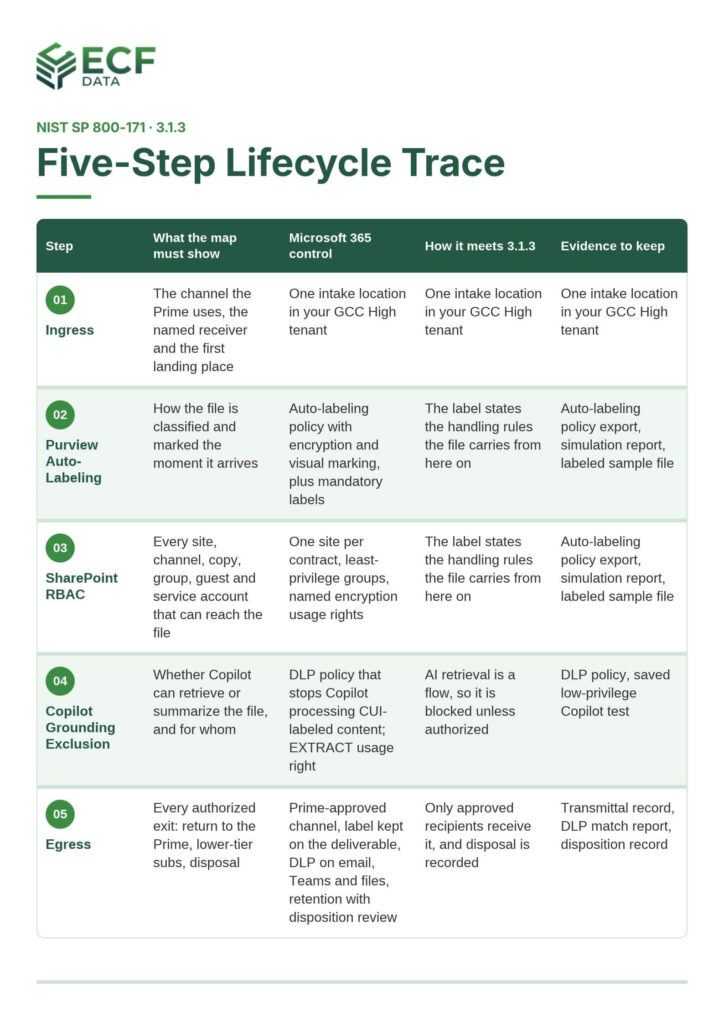
Walk the File Through Each Step
1. Ingress: the handoff from the Prime
Record the channel the Prime uses (a portal, encrypted email or managed file transfer), the named person who receives the file, and the first place it lands. The first leak risk is a file that sits in a personal mailbox or a Downloads folder before it reaches governed storage.
Most defense subcontractors run this in a GCC High tenant because DFARS 252.204-7012 expects cloud providers that hold covered defense information to meet FedRAMP Moderate equivalence. Confirm that against your own scoping rather than assuming it.
3.1.3 test: can you name the approved channel and the person who may receive the file, and show the log entry for its arrival?
2. Purview auto-labeling: label at the door
The label is what turns a Prime’s marking into a rule your tenant can enforce. Microsoft lists auto-labeling for Exchange Online, SharePoint Online and OneDrive, and mandatory labels, as available in GCC High. Build an auto-labeling policy for the intake location that applies the CUI label, encryption and a visual marking that matches the banner. Do not rely on a library default label alone: the same page showed a default label for unlabeled uploads to SharePoint libraries as still in development when we checked on October 29, 2026.
Label the files, not just the containers. Microsoft’s Copilot guidance states that container labels aren’t inherited by the items in them, so a labeled team or site does not label its files.
3. SharePoint RBAC: who and what can open it
A Teams channel is a front end for SharePoint. Standard channel files sit in the team’s site, private and shared channels get their own sites, and a file shared in a chat is stored in the sender’s OneDrive. Add each of those as a box on the map, plus meeting recordings, email attachments, the OneDrive sync client and any laptop that holds a local copy. Mark each box in or out of scope and write the reason.
Keep CUI for one contract in one site. Then list every group with access, every guest and every service account. Remove broad groups such as “everyone except external users”, and break inheritance only where you can explain it. Encryption with named usage rights adds a second gate that follows the file when someone downloads it.
3.1.3 test: for any person or account on the access list, can you point to the approval that authorizes them?
4. Copilot grounding exclusion: keep CUI out of what Copilot can read
Permissions decide who can reach the file. Microsoft states Copilot can only summarize or reference content the user is authorized to access, so over-broad access from step 3 becomes over-broad Copilot answers. To exclude CUI from grounding, add a Purview DLP policy that stops Copilot processing content with your CUI labels, and keep the EXTRACT usage right limited to the people who need it. A roadmap item for this DLP capability is tagged GCC High and generally available. The Copilot section below lists the gaps this does not cover.
3.1.3 test: sign in as a user with no CUI access, ask Copilot for the file by contract name, and save the refusal.
5. Egress: return to the Prime and retire your copies
Every exit goes on the map with the authorization behind it. Sharing CUI with a lower-tier subcontractor is a flow-down event: the 7012 flow-down obligations remain in effect. Scope label encryption to named users, restrict external sharing on the CUI site, and run DLP on email, Teams and files. Those DLP locations are listed as available in GCC High.
Return the deliverable through the channel Prime approved, keep the label and CUI markings on it, and log who sent it, when, and to whom. If Copilot helped draft it, check the result: Microsoft says generated content inherits the highest-priority sensitivity label when supported.
At contract end, follow the return-or-destroy clause you recorded at the top of the map. A retention label with a disposition review gives you a decision point and a record. Requirement 3.8.3 covers sanitizing or destroying media that holds CUI, so keep that record next to the transmittal.
3.1.3 test: for every external recipient on the map, can you show the authorization and the log of what was sent?
Where Purview sensitivity labels sit on the map
A sensitivity label is the one control that travels with the file through all five steps. It classifies the file, can stamp a visible marking, can encrypt it with named usage rights, and gives DLP and Copilot something to read. That is why Microsoft Purview sensitivity labels for CUI sit at the center of the diagram.
Configure these five things
- One label per CUI category your contracts name. Keep the taxonomy small and tie each label to the marking the Prime used.
- A visual marking that matches the banner. Requirement 3.8.4 expects system media that holds CUI to carry distribution limits, handling caveats and applicable CUI markings, and a header or footer applied by the label makes that repeatable.
- Encryption to a named group with deliberate usage rights. Avoid user-defined permissions for CUI that other services must read, because Copilot agents can’t read files with user-defined label permissions.
- Auto-labeling and mandatory labeling. Both are listed as available in GCC High.
- DLP rules for email, SharePoint, OneDrive and Teams, with a test file that proves each rule fires.
What labels do not do
- They do not decide what is CUI. The CUI program sets marking rules; the CMMC FAQ says the program makes no change to CUI marking requirements. A label reflects the Prime’s decision and does not replace the marking on the document.
- They do not cascade from containers. See step 2.
- They do not behave the same in every cloud. Features differ between commercial and GCC High, and Microsoft notes that statuses can change. Check the GCC High Purview service description for each feature before you write it into your SSP. For example, the same page lists label-based conditional access for SharePoint sites as on the engineering backlog.
Stop Copilot oversharing before you turn it on
Copilot does not break permissions. Microsoft states it can only summarize or reference content the user is authorized to access. The risk is that it makes every over-broad permission you already have easy to find. A CUI folder that “everyone” could technically open stops being obscure the day someone asks Copilot a question about the contract.
Copilot became generally available in GCC High since December 2025, and a Microsoft 365 roadmap item for DLP that restricts Copilot processing of labeled content is tagged GCC High and generally available. Confirm both against your own tenant before you rely on them.
What Copilot Honors
Per Microsoft’s Purview guidance for Copilot:
- With VIEW but not EXTRACT on encrypted content, Copilot will not summarize it. It can only link to it.
- A Purview DLP policy can stop Copilot from summarizing labeled and encrypted files and emails.
- Copilot reads labels from your own organization, so a label applied in the Prime’s tenant is not one your own DLP or Copilot rules can act on. Map what your tenant sees, not what the sender intended.
Gaps to put on the diagram
- Container labels are not inherited by files, so a labeled site does not make its files invisible to Copilot.
- Labels that protect Teams meetings and chats are not recognized by Copilot, except meeting invites.
- Encryption applied without a label and without EXTRACT can still be returned in some cases.
- Channel Agent in Teams checks EXTRACT only for the person who asks, and DLP cannot stop it from summarizing labeled files. Decide deliberately whether it runs in any channel that holds CUI. Admins can turn it off.
A four-step pre-Copilot check
- List the sites and channels that hold CUI for each contract.
- Fix permissions: remove broad groups, stale guests and unneeded inherited access.
- Label and encrypt the files, then switch on Copilot DLP for the CUI labels.
- Sign in as a user with no CUI access, ask Copilot for the file’s contents by contract name, and save the refusal as evidence. Repeat with a user who has access and confirm the output carries the label.
Then add Copilot to the data flow diagram as a reader inside the boundary.
What an assessor will ask to see
Expect questions to start at the diagram and move to the configuration. Under requirement 3.1.3, assessors are described as reviewing network diagrams that show CUI flow paths, testing DLP policies and verifying that classification labels are applied. Have these ready for your one-file trace:
- The data flow diagram, tied to your network diagram and SSP, with each step from the table above
- Your asset inventory, with the SharePoint sites, Teams channels and Copilot marked in or out of scope
- Exports of label policies, auto-labeling policies and DLP rules, dated
- A test file that triggers each DLP rule, and the resulting alert
- The Copilot test from the pre-Copilot check, with the user accounts named
- Audit log entries showing the file’s arrival, access and return
- Training records for the people who receive and send CUI
This evidence is useful now, not only if third-party assessments return. Phase 1 self-assessments still go into SPRS with an annual affirmation, and the Department of Justice announced False Claims Act settlements over NIST SP 800-171 gaps in June and September 2026. Those are allegations, but they show that the claimed score is expected to match the environment.
Frequently Asked Questions
How do subcontractors track CUI data flow in Microsoft 365 for CMMC Level 2?
Pick one real CUI file and trace it through five numbered steps: ingress from the Prime, Purview auto-labeling, SharePoint role-based access, Copilot grounding exclusion, and egress back to the Prime. For each step, record the system, the people, the control and the evidence, so the trace shows how you control the flow of CUI under NIST SP 800-171 requirement 3.1.3.
Does my Prime’s data flow diagram replace mine?
No. The Prime’s diagram stops at the boundary of its own system, and yours must show what happens inside your tenant. Use the Prime’s diagram to confirm where your boundary begins, then draw the rest.
Does applying for a Purview label make a CUI file?
No. The DoD or your Prime decides what CUI is and marks it. The label records that decision in your tenant and enforces handling rules. If a file arrives unmarked and you suspect it is CUI, ask the Prime or the contracting officer and keep the reply.
Can Copilot read CUI stored in SharePoint?
Copilot can reach only content the signed-in user is authorized to open, and encrypted content also needs the EXTRACT usage right before Copilot will summarize it. Gaps remain, such as container labels that files do not inherit, so test with a low-privilege account before you enable it for CUI users.
Can Microsoft 365 Copilot be used in a CMMC Level 2 environment handling CUI?
Yes, but only if your tenant is properly configured (typically in a GCC High environment with strict compliance licensing) and your sensitivity labels enforce encryption. Without Purview policies blocking unauthorized model training and file indexing, Copilot can inadvertently expose CUI to unauthorized internal users.
Are subcontractors required to use specialized GCC High environments for CUI?
While the Department of Defense does not explicitly mandate “GCC High” by name, the strict implementation of NIST SP 800-171 controls—such as FedRAMP Moderate/High cloud requirements, strict access governance, and FIPS validation—makes GCC High or equivalent sovereign cloud environments the practical standard for defense subcontractors handling CUI.
About ECF Data
ECF Data is a cybersecurity service provider that helps Defense Industrial Base contractors secure their cloud environments and meet federal mandates such as CMMC, with expertise in Azure deployment and managed IT services. If you want a second set of eyes on your CUI flow, contact ECF Data to lock down your M365 boundary.