
-
By: Janina Criador
- IT Management
- Last Updated On: September 18, 2026
- Comments 0
- ⏱️9 min read
Microsoft 365 GCC High Price Increase July 2026: A Complete Optimization Guide
The cost of maintaining a secure cloud environment is about to rise. Effective July 1, 2026, Microsoft is implementing global list price increases and packaging structural changes across its commercial and government cloud suites. Because government SKU updates mirror commercial rate shifts, these changes directly impact GCC and GCC High environments.
For companies in the DIB, GCC High helps meet strict cybersecurity requirements like CMMC, ITAR, and DFARS. But without license optimization, costs can quickly drain IT budgets.
This guide explains what’s changing on July 1,2026, breaking down the new pricing structure. It also provides strategies to optimize seats, lock in contracts, and reduce licensing costs before the deadline.
Read our comprehensive breakdown on and learn how to buy your licenses directly through our transparent online store.
What Are the Exact New Prices for M365 G3 and G5 After July 1, 2026?
The Microsoft 365 government pricing update mirrors commercial Enterprise suite changes, with GCC, GCC High, and DoD SKUs all moving in lockstep. Here are the confirmed increases for government suites:
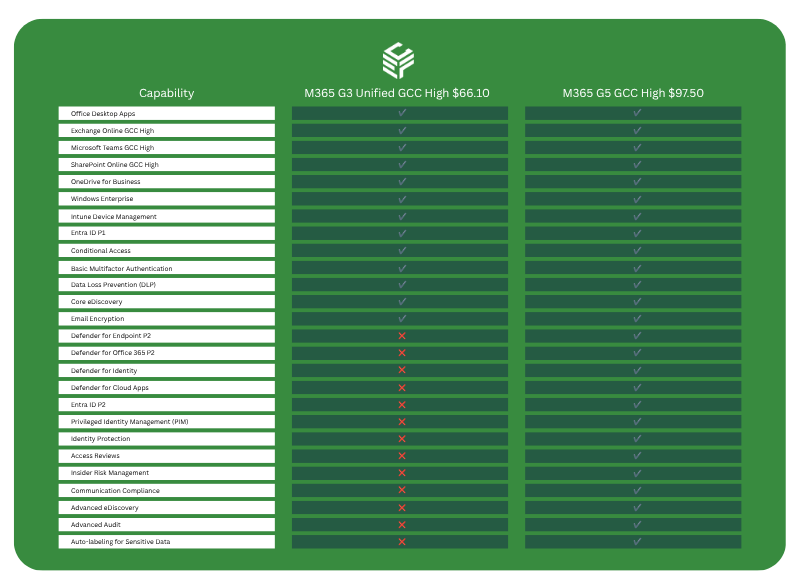
An important note: Per federal regulations, government suite price hikes exceeding 10% must be phased over multiple years. Consequently, the 13% Office 365 E3 GCC High increase may not hit all at once. Check with your contracting officer and licensing partner to confirm your specific schedule.
For a 500-seat GCC High G3 deployment, an 8% increase translates to roughly $12,000 to $15,000 in additional annual spend, depending on current contract pricing. At the G5 level with its broader security stack, a 500-seat shop at the 5% increase rate adds approximately $18,000+ per year. These are material numbers on a government program budget.
How Do You Lock in Current GCC High Rates Before the July 2026 Increase?
The single most impactful action a defense contractor can take now is to renew or extend their Enterprise Agreement (EA) or Microsoft Customer Agreement for Government (MCA-G) before July 1, 2026. Current pricing is locked until your renewal date. For example, if your agreement expires in December 2026 or later, your rates won’t change until then.
Here is a concrete action checklist:
- Pull your renewal date immediately. Log into the VLSC or your Microsoft 365 admin center and confirm your EA anniversary date. If it falls after July 1, 2026, you are buffered. Document this formally with your licensing partner.
- Evaluate an early renewal. If your agreement renews after July 1, discuss with your Microsoft partner whether an early true-up or renewal executed before July 1 locks you into current pricing for another 12–36 months. For a large GCC High deployment, this can be a six-figure savings decision.
- Engage your LSP or CSP now, not in June. Government-channel licensing partners — particularly those with FedRAMP experience and GCC High specialization — need time to process amendments. A late May rush will face queue delays. Initiate conversations in Q1 or early Q2 2026.
- Document your seat count before you renew. Renewing with inflated seat counts locks in higher spend at the new price point. A pre-renewal audit is non-negotiable.
Can You Use GCC High Business Premium Instead of G3 to Save Money?
Yes. For many small-to-mid-size defense contractors and cleared firms, M365 Business Premium GCC High is a legitimately underutilized alternative to M365 G3 GCC High that the 2026 update makes even more attractive.
Why Make the Business Premium GCC High Switch?
- Microsoft has confirmed zero price increase for Microsoft 365 Business Premium GCC High in the July 2026 update.
- Business Premium GCC High includes Defender for Business, Intune, Azure AD Premium P1, and Defender for Office 365 Plan 1—key tools for CMMC Level 2 compliance.
- The suite is capped at 300 users per tenant, making it purpose-built for boutique defense contractors, cleared facilities, or program-specific enclave environments.
The G3 vs. Business Premium GCC High comparison for CMMC-scoped environments:
Please refer to the table below to get an overview comparison:
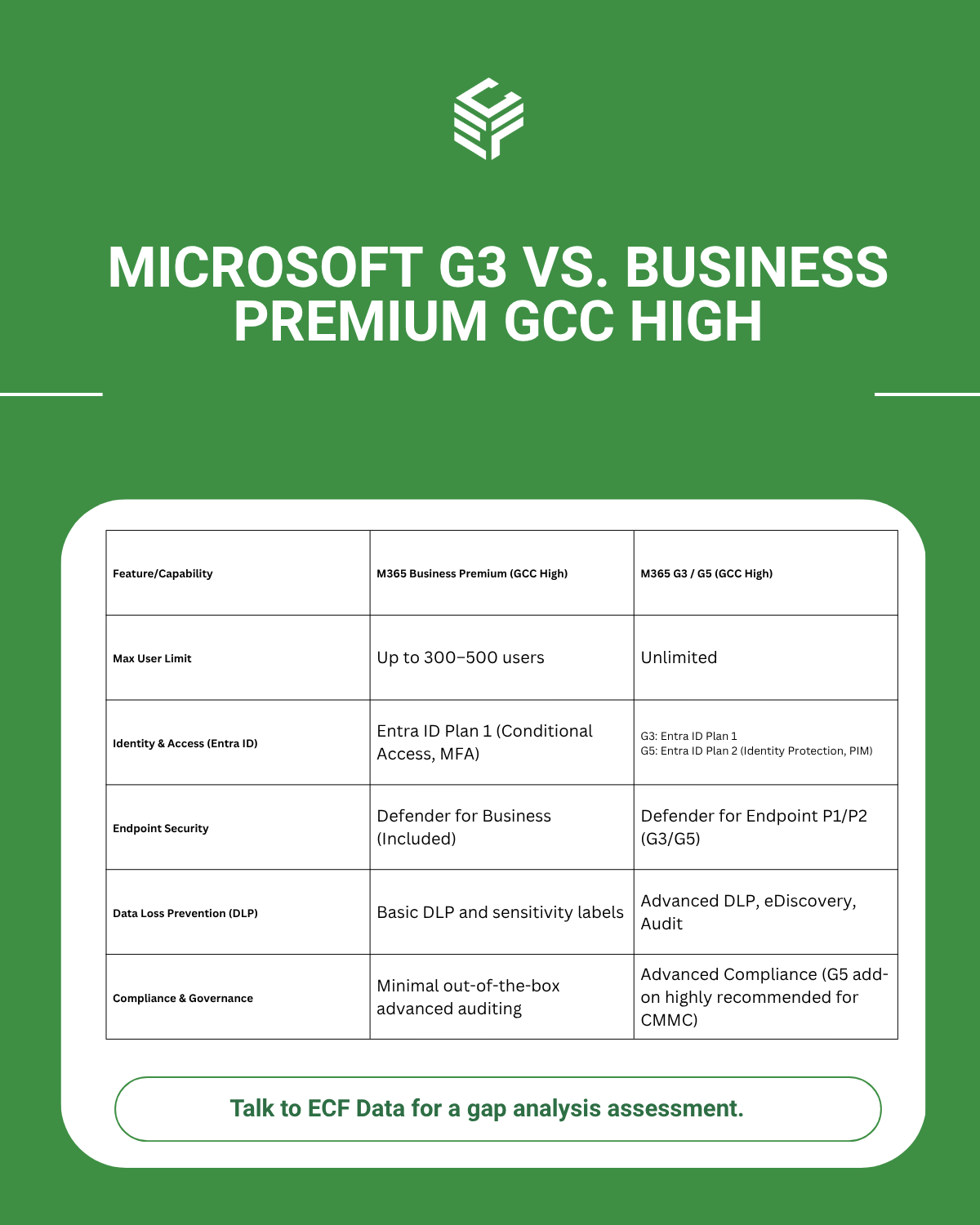
Work with your licensing partner to run a feature-gap analysis against your specific CMMC scope, STIG requirements, and internal IT capabilities before making the switch.

What is the Reason Behind the 2026 Cost Hike?
Microsoft isn’t raising prices in a vacuum. They are bundling security and management capabilities into government suites. GCC High customers, moreover, will receive a more limited set than their commercial E3 counterparts due to compliance validation timelines.
New features confirmed for Microsoft 365 G3 GCC High in 2026:
- Microsoft Defender for Office 365 Plan 1 — adds Safe Links, Safe Attachments, and anti-phishing policies natively into the G3 suite. This was a separate add-on license previously.)
- Intune Plan 2 — expanded device management capabilities.
- Intune Advanced Analytics — endpoint analytics and reporting.
- Copilot Chat enhancements — including inbox and calendar awareness and access to Word, Excel, and PowerPoint agents (pending Microsoft 365 Roadmap availability for GCC High).
What G3 GCC High does not get (yet) vs. commercial E3:
Intune Remote Help is confirmed for GCC but not listed for GCC High in the 2026 packaging update.
New features confirmed for Microsoft 365 G5 GCC High in 2026 (in addition to G3 additions):
- Intune Endpoint Privilege Management — least-privilege endpoint control, a significant CMMC and NIST 800-171 alignment feature.
- Copilot Chat enhancements (roadmap-dependent for GCC High).
Note that Microsoft Cloud PKI, Intune Enterprise Application Management, and Microsoft Security Copilot — all bundled into the commercial M365 E5 — are confirmed for GCC (standard) and GCC/DoD respectively. However, it is not explicit for GCC High in the 2026 wave. Defense contractors should track the Microsoft 365 Government Roadmap for GCC High-specific feature availability and factor this into their G5 upgrade timing decisions.
Does the 2026 Price Increase Hit Frontline Worker F1/F3 Government Licenses?
Unfortunately, yes. More importantly, frontline government licenses face the steepest percentage increases in the entire 2026 update. This is a significant budget exposure for defense contractors with large populations of manufacturing workers, security staff, or facility personnel who hold F1 or F3 licenses.
Confirmed government frontline price changes:
- Microsoft 365 F1 (Government): 33% increase
- Microsoft 365 F3 (Government): 25% increase
These increases mirror the commercial frontline suite changes. A 33% jump on F1, even from a low base price, compounds quickly at scale. A contractor with 1,000 F1 seats currently paying $2.25/user/month will move to $3.00/user/month, adding $9,000/year in licensing cost on that tier alone.
Practical frontline optimization strategies:
Audit actual F1 vs. F3 usage. Microsoft F3 includes full Office desktop apps; F1 does not. If F3 holders are only using web-based apps and Teams on shared devices, they may be eligible for F1 downgrade. This can save $7/user/month even after the increase.
Evaluate shared device licensing. Frontline workers on shared kiosks or ruggedized terminals may qualify for Microsoft 365 F3 shared device mode. It has different licensing economics that your LSP can model.
Identify inactive frontline accounts. Seasonal workers, departed employees, and inactive accounts are a disproportionate problem in frontline license pools. A 10% reduction in an F3 frontline pool of 500 seats saves $6,000/year post-increase.
How Do You Run a Licensing Audit to Trim Unassigned GCC High Seats Fast?
A licensing audit before your next renewal or before July 1, 2026 is the fastest, highest-return activity available for GCC High customers. Industry data consistently shows that 15–30% of enterprise Microsoft 365 seats are either unassigned, underutilized, or assigned to departed users at any given time. In a GCC High environment, where personnel turnover from contract changes, cleared staff transitions, and re-compete losses is common, this problem is often worse than average.
5 Steps for a rapid GCC High seat audit — five steps:
Step 1: Pull the Microsoft 365 Usage Reports. In your M365 Admin Center (GCC High tenant), navigate to Reports > Usage. The “Microsoft 365 Apps Usage” and “Active Users” reports show last-activity dates per license. Any account with no activity in 30+ days is a candidate for review.
Step 2: Cross-reference with your HR or FSO roster. Cleared personnel changes are tracked through your Facility Security Officer. Export your active personnel roster and cross-match against licensed accounts. Former employees whose accounts weren’t deprovisioned are low-hanging fruit.
Step 3: Identify license tier mismatches. Are G5 licenses assigned to users who never touch Defender, Purview Advanced, or eDiscovery? Downgrade candidates to G3 save the full G5-to-G3 price differential per user. Given the bundled security additions coming to G3 in 2026, the gap between G3 and G5 value is narrowing for mid-tier users.
Step 4: Audit add-on licenses separately. GCC High environments commonly carry add-on SKUs — Defender for Endpoint P2, Power BI Premium Per User, Audio Conferencing — that are often orphaned when users leave or are moved to different programs. These are frequently missed in top-level seat counts.
Step 5: Document and act before renewal. Findings must be actionable before your EA renewal date or before July 1, 2026, whichever comes first. Work with your Microsoft licensing partner to submit seat count reductions through the appropriate true-up or amendment process.
Tooling options: Microsoft’s own Productivity Score and Viva Insights (where available in GCC High) provide usage depth. Third-party tools offer more granular right-sizing analysis for complex cleared environments.
A Summary for Defense Contractors
The upcoming M365 price hike represents the most significant cost event for the cleared DIB in recent years. With an 8% increase on M365 G3 GCC High, a 13% jump on O365 E3 GCC High, and a massive 25–33% surge on frontline worker SKU pricing, defense contractors with large, cleared support workforces are facing material budget impacts.
At ECF Data, we believe this increase is an opportunity for optimization.
How ECF Data Helps You Defend Your Bottom Line
Here is how ECF Data is actively partnering with clients to mitigate the impact before July 1:
- Licensing Audits & Seat Optimization: We analyze your active tenant usage to eliminate “shelfware” and ensure you aren’t paying the new, higher rates on unassigned or redundant seats.
- The M365 Business Premium GCC High Alternative: Under 500 users? ECF Data can transition you to Business Premium GCC High for an optimal compliance baseline at a much better price.
- Activating Your Paid Compliance Features: Microsoft is bundling tools like Defender for Office 365, Intune Plan 2, and Advanced Analytics into its licenses to justify the price increase. If you’re paying more but not using them, you’re losing both value and security. ECF Data ensures these capabilities are fully deployed to meet CMMC Level 2 and NIST 800-171 Rev 3 requirements.
Action Item: Check Your Admin Center Today
With Microsoft’s standard 30-day Message Center notices now live in your tenant ahead of the July updates, the clock is ticking.
Let ECF Data manage the feature rollout across your GCC High environment to maximize your security ROI without causing operational disruption. Reach out to your ECF Data Account Manager today to schedule an emergency licensing and compliance alignment review before the July changes take effect.